
An introduction for those don’t know me
I’m currently a mathematical biology PhD student and have a congenital sensorineural hearing loss in both ears – I wear a hearing aid in my left ear and am profoundly deaf on the right. Given that I’m in my late 30s however, it’s safe to say I do have some advantages over a typical younger PhD student in terms of maturity and life experience.
Naturally, this means requesting accommodations at conferences and while I think I’ve found my nice in-between, it’s taken a fair while of thinking and advising and experimenting so it only behooves me to write it all down somewhere so that hopefully someone else might benefit!
Over the past year I’ve been lucky to attend an applied maths conference, an audiology conference and an accessibility conference, and one takeaway I’ve noticed is the difference in accessibility offered without question. Naturally, an accessibility conference would pull out all of the stops, the audiology conference had a lot of industry funding, but in applied maths (within the Australian public tertiary education sphere) we’re noticeably poorer with minimal sponsorships/industry partners, if any. That said, all of my experience below is accumulated over several conferences I’ve attended sporadically within the past…..10 years or so.
Conference Formats
A conference will have a mixture of talks and activities depending on the subject/area, sometimes there’ll be training offered, other times it’s workshops and brainstorming sessions. In this blog post I’m purely addressing accessibility for conference talks, but all of the solutions listed below are adaptable for other conference scenarios.
A conference with too many talks will have multiple streams, and not all talks will be of the same length. Talks from more important/established speakers could take an hour, other talks can be as short as 15-20 minutes and they are usually clustered together by common topic.
Different Accommodation Strategies I’ve Tried/Experienced
Live (Remote) Captioning
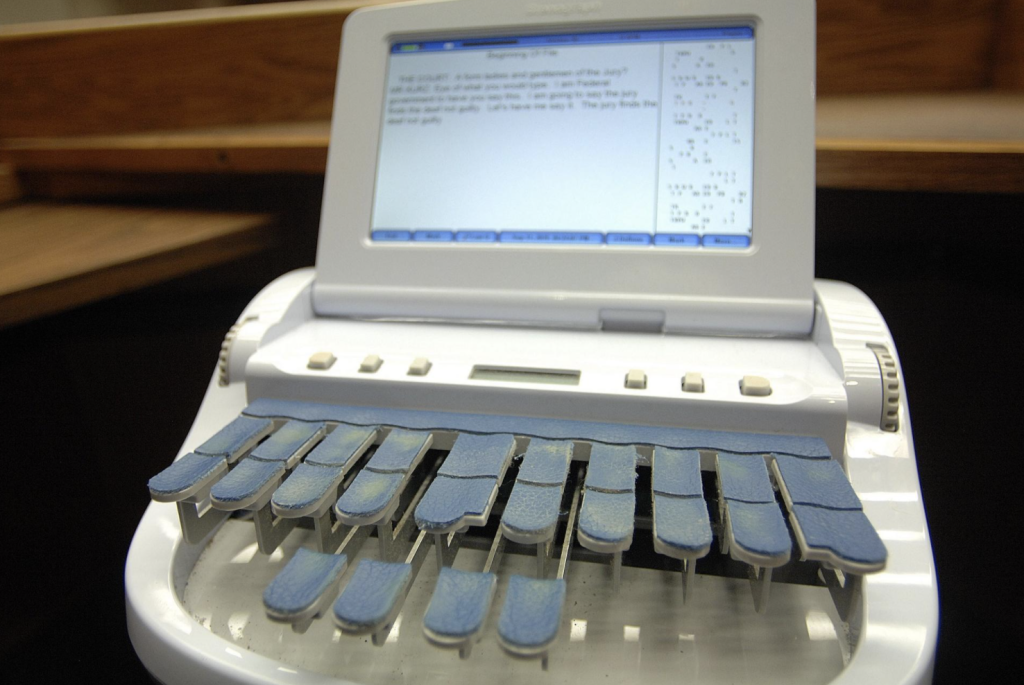
This involves hiring a stenocaptioner (i.e. someone to transcribe what’s being said, they type on an especially designed keyboard). This in my experience results in the highest accuracy possible so long as all the additional considerations are taken care of.
Considerations
- Expensive: Expect to pay $200+AUD per hour for one, which is not financially viable for conferences with multiple talk streams.
- Requires presenters to send through a word list of terminology/jargon/names that the captioner has to manually enter into their dictionary so that they can sufficiently transcribe the word being said. Sometimes it’s sufficient for presenters to send their slides through (but I have seen some people do up their slides at the last minute!).
- Ideally the stenographer/captioner is also competent in the terminology (which gets harder the more niche the topic area). They may not necessarily know what it means, but will understand the context in which certain terms are used, and when to adjust grammar, capitalisation, and so on.
- Requires additional tech setup. If the captioner is attending in person, they’ll need to hook up their equipment and have the captions be displayed on a screen. If the captioner is remote, there will need to be an audio stream sent through and their captions broadcasted back, as well as a person on-site for any communication.
Setting up voice-to-text/live captions on the room’s computer
On Windows, it is possible to set up Live Captions for any audio source, and this is one way that it can appear (indicated by a red box and arrow):
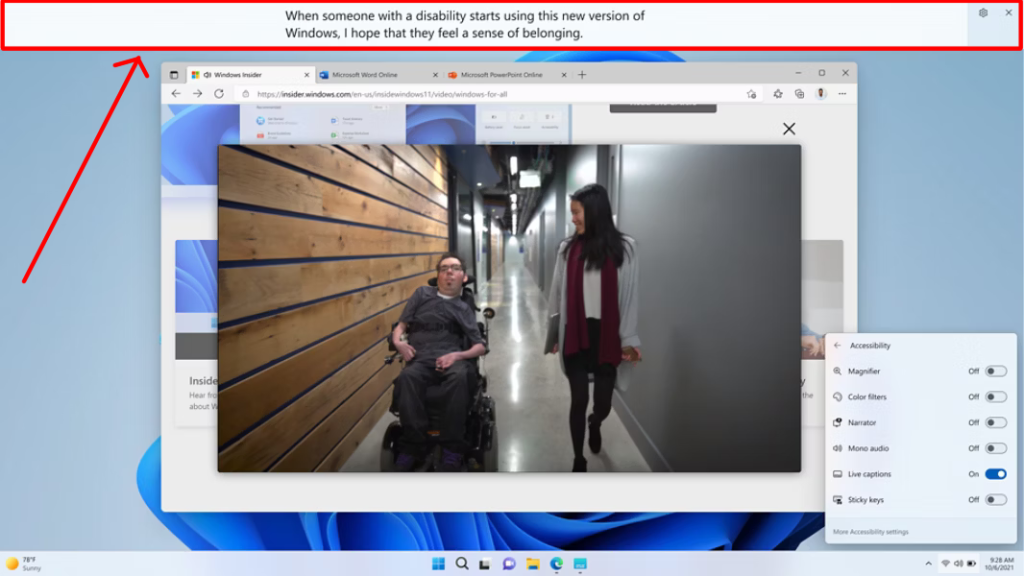
However it’s also possible to change it to the classic “white text on dark background” style as is expected most movie captions. This is a very easy set-and-forget solution, that can also be easily disabled.
Considerations
- Ideally this set up is easily done on the computer attached to the projector, which means that presenters will need to load their presentations onto the computer beforehand.
- Some tech setup and configuration is needed, and ideally presenters are equipped with the correct microphones that feed into the computer as well.
- This set up does cut off part of the screen for the captions to appear, which will affect presenters’ slides.
- As of writing, accuracy isn’t a solid guarantee – but I would say for any non-specialised conference (i.e. one without a significant amount of jargon and/or unfamiliar names) this is a sufficient solution. Very obviously I can’t say this for my applied maths conferences. There are definitely other programs/apps/websites that can do this but I’m not familiar with the variety.
- Not everybody appreciates captions for various reasons – some find it distracting.
- This set up does cut off part of the screen for the captions to appear, which will affect presenters’ slides.
Presenters wear a microphone that transmits direct to my hearing aid
Companies that sell hearing aids also sell equipment that pair with said hearing aids. For my Widex Moment, there is the Widex Sound Assist that I basically describe to others like a ‘detachable ear’, in that it’s a microphone that transmits directly to my hearing aid. It allows me to hear anybody as if they were talking to me directly.
It’s very straightforward for me to walk up to a speaker and ask them to wear an additional microphone, and then retrieve it after the talk.
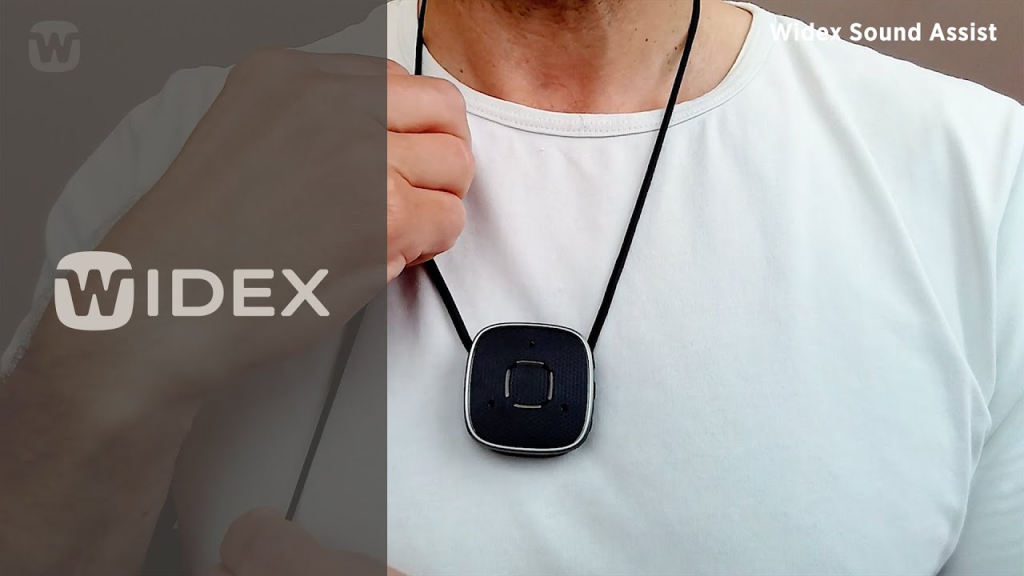
In comparison with the two other accommodations this is one that I can initiate myself and not necessarily need to get in touch with the organisers with.
Considerations
- This usually works well for single-speaker events, but when there’s a chain of speakers it gets a bit cumbersome especially if there isn’t a person (or chair) that helps with managing the microphones.
- It’s a solution that only benefits me, which most might think is fine, but it’s worth thinking about accessibility measures that also benefit others (indirectly).
- This solution also however assumes I’m also concentrating enough to listen, which admittedly given that I do have a bit of ADHD/distractability, is not always plausible.
- This solution means I cannot hear any audience questions unless the speaker repeats/paraphrases them, which leads me to my latest experiment.
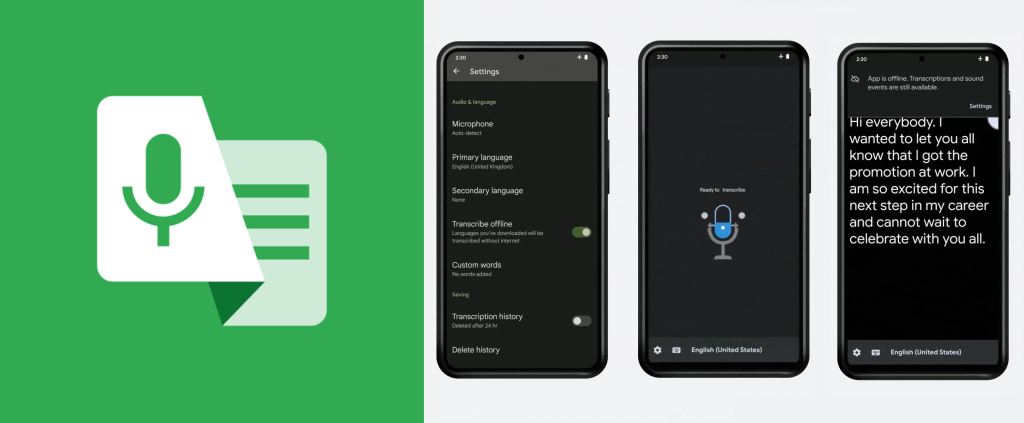
Presenters are sufficiently equipped with microphones, audience question-askers use a hand-held microphone, I use a voice-to-text app (Google Live Transcribe) on my phone
Where I am, conferences have been pretty good at having a basic text block on their registration form where they ask people to list their accessibility considerations. These days I’ve taken to writing “Presenters should speak into a microphone or be sufficiently equipped with lapel microphones, audience members asking questions should also be given a microphone as well” and it’s been very interesting to see how well this gets executed.
Back doing the COVID pandemic, lockdowns, and mask-wearing, someone posted a video about using Google Live Transcribe on their phone, and holding it to their mouth, in order to help hard-of-hearing people. However across a distance, transcription quality starts to falter (which makes sense given sound volume is on a logarithmic scale), but with some random testing I noticed that it was sufficient if I was sitting close to the speaker and they were using the room-provided microphones. Hence this solution.
Comments/Considerations
- I’m very surprised at the small handful of people who think they don’t need a microphone.
- The last conference I went to only had microphones attached to the lectern (i.e. no lapel microphones, only the main theatre room had one handheld microphone) which meant that if anyone deviated from them, volume would drop and therefore transcription quality would drop. Correcting this would mean properly screening conference venues for these things, which is probably not the easiest thing to do, and would rank very low on the checklist.
- The chairs (i.e. people introducing the speaker, taking audience questions) would need to be sufficiently aware of needing to hand out microphones to the audience. If they’re not used to doing that, it’s very easy for them to forget. This happened at a public lecture late last year where the chair didn’t notice there were two people on the sides waiting to hand microphones off, and he kept taking questions without waiting for them to hand off the microphones.
- Transcription quality will always be dependant on the app used. Google Live Transcribe is reasonably competent in my experience, unfamiliar words are at least consistently incorrect, but definitely could not recommend for jargon-heavy topics.
Ending thoughts
It’s definitely taken a lot of exercising of patience when requesting accommodations and trusting in other people to get things right. I still struggle, the negativity still flares up internally, but I’ve gotten better at not expressing them because I recognise it’s not productive for everyone involved.
It’s only natural that I’ve attempted to move towards solutions which minimises the effort of people involved, because encouraging change in human behaviour is difficult. Lest of all of extremely busy academics!
The perspective I communicate, based off my years of teaching experience, is that teaching people to do good accessibility things is the same as teaching anything else: there will be people who stuff things up the first go, others might need a bit more reminding, some people might struggle to implement the accommodation without knowing why, revealing myself as the one who benefits also helps them with motivation (and letting them know it’s not just old people who have hearing loss!).
What’s next?
There are probably two three main things I want to try out that would merit coming back and updating this blog post:
- Different voice-to-text apps and comparing accuracy, especially in jargon-heavy topics.
- Captioning glasses. There are a handful on the market, the ones I know of are Captify (which seem genuine given their founder is also hard-of-hearing, but still a big question mark on quality of transcriptions for me), and Hearview (which did a big social media push on Instagram, but doesn’t seem to be doing too well otherwise). However given that they’re both based in the US and affording one is basically a huge chunk of my fortnightly PhD stipend, I probably won’t be trying them out anytime soon!
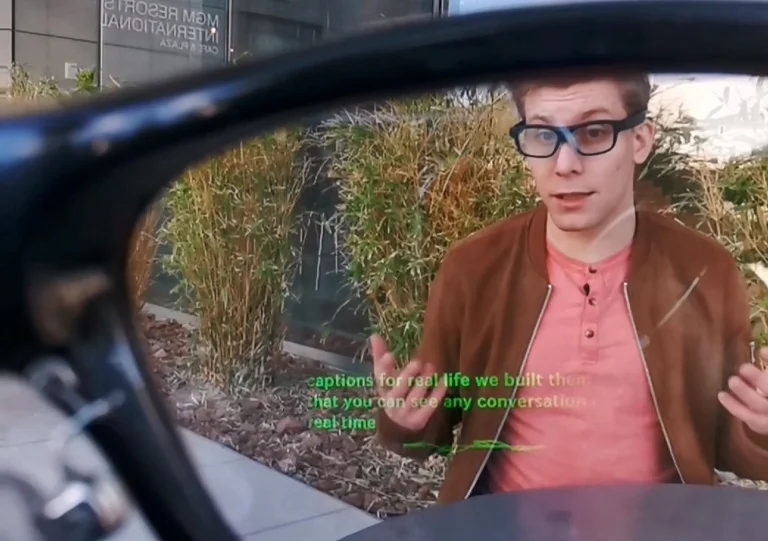
[Added 20/02/2026] 3. Thanks to some conversations following this post I was reminded of Auracast, which uses Bluetooth LE and can transmit from one person to multiple listeners. Since most people are already familiar with Bluetooth, using it should be fairly straightforward and it’s more a question of venues implementing it. More modern phones and hearing aids should have Bluetooth LE installed, given both it should be possible to pair your hearing aid(s) directly to your phone (which I can do with my Widex Moment 440 and my Google Pixel 8a).
What can you do to help hard-of-hearing people like me in these situations?
If you are a conference organiser: When you’re screening venues, request a list of audio equipment available. Ideally both (wireless) handheld and lapel/lavalier microphones should be available for every presentation room. Any modern lecture theatre should have these equipment, but the same can’t be said for conference venues (e.g. hotels, weddings).
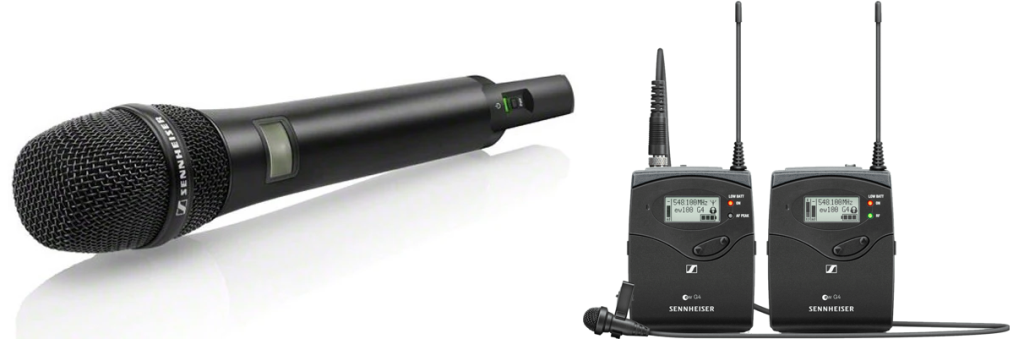
Images shamelessly stolen from the internet.
If you are a chair/announcer (i.e. someone who introduces the speakers, and takes audience questions):
- Check that all audio equipment is sufficiently working before the start of your session and ensure you know how to operate them. You can prepare for this by familiarising yourself with any audio equipment in the lecture theatre. At worst, you should need to only switch them on, and adjust settings on the room’s computer.
- Ensure the next speaker is ready to be fitted with both audio equipment and clicker (if available). This heavily depends on the setup – sometimes it’s possible to fit them before hand, other times you’ll need to do it quickly during the transition period.
- If the lecture theatre is large such that handing a question-asker would involve a long-enough walk, recruit one or two assistants to provide microphones to the audience members during question time.
If you are a speaker:
- Be aware of your preferred way of presenting. If you’re someone who likes to walk around and point at the screen, then ideally there is a handheld or lapel mic available to allow you that flexibility. If there’s only a fixed mic on a lectern, then you’ll want to know to stay in one place and use a laser pointer as an indicator.
- Any questions asked by the audience, repeat or paraphrase the question so that the rest of the audience can hear. It’s also a good way to delay answering while you come up with an answer.
- If there are complicated terminology and/or names unfamiliar to your audience, ideally they’re also written on the slides so that listeners can connect pronunciation to written word.
- Any picture/animation-only slides can end up being unhelpful. I generally like to suggest at least one sentence, or one visual indicator, to intentionally direct your audience’s attention to the point being made.
[Added 20/06/2026] If you are in charge of building facilities/management/equipment, look into getting Auracast installed for your conference venues and lecture theatres.
One Comment
Good thoughts Matt, as an event organiser it’s sometimes hard to insist presenters use microphones, especially if they are not being paid for their time. However I think this can be fixed by providing clear expectations and accessibility guidelines for talks and presentations at the outset.
I’ll be referring back to this post for my next conference. Thanks again for your thoughts.